
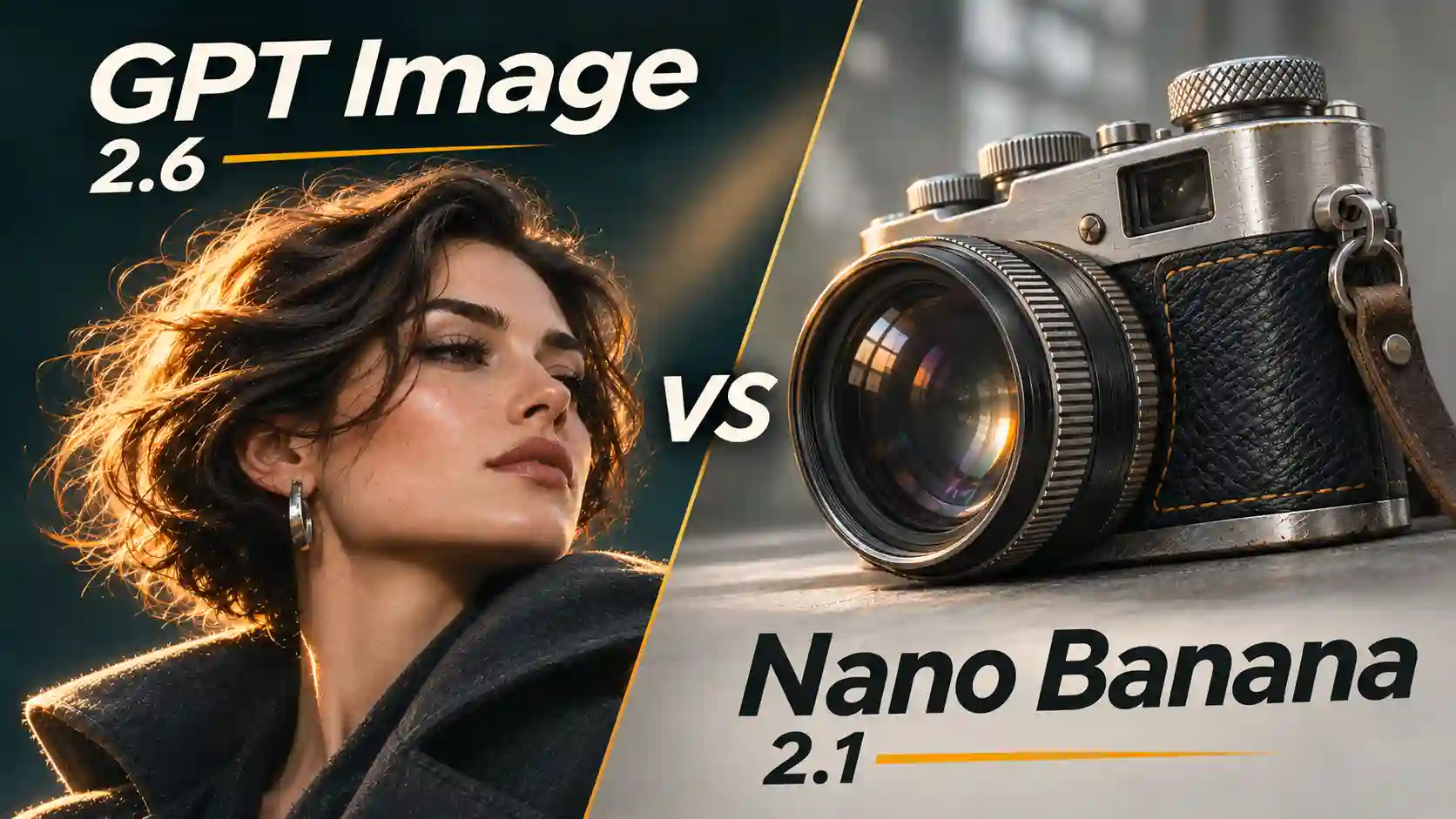
Choosing an AI image generator means balancing visual appeal with the details your project needs to preserve. This GPT Image 2.6 vs Nano Banana 2.1 comparison examines both: how the images look and how closely they follow a creative brief.
TL;DR
GPT Image 2.6 favored visual polish: softer photographic lighting, stronger poster hierarchy, and more deliberate scene styling in our results.
Nano Banana 2.1 favored natural rendering and layout fidelity: materials looked more distinct, and prescribed compositions stayed closer to their references.
Both handled important basics well: the tested poster copy was correct, and character and product references remained recognizable without obvious errors.
The main trade-off was creative freedom: attractive improvements sometimes came with changes to framing or layout that we had not requested.
GPT Image 2.6 vs Nano Banana 2.1 at a Glance
Separate model specifications from creative results.
This table summarizes published model and API capabilities. Controls available in individual interfaces may differ.
Specification | GPT Image 2.6 | Nano Banana 2.1 |
Developer | OpenAI | |
Model variants | Sunburst: detail; Flare: speed | Efficient generation and editing |
Input types | Text, images | Text, images, video, PDF |
Output types | Images | Images, text |
Output sizes | Examples: 1024², 1536×1024, portrait | 1K, 2K, 4K |
Aspect ratios | Examples: 1:1, 3:2, 2:3 | Multiple presets, including 1:8 and 8:1 |
Reference images | Up to 16 | Up to 14 |
Quality settings | low, medium, high, xhigh, max | Resolution-based selection |
Planning / reasoning | Complexity: low, medium, high | Thinking: minimal, medium, high |
Default planning level | high | medium |
Image editing | Supported; markup guidance | Supported; conversational editing |
Transparent backgrounds | PNG, WebP | No explicit output parameter documented |
SVG output | Supported through API workflow | Native support not documented |
GIF output | 2–16 frames; preview access required | Native support not documented |
Built-in search | Not documented for image endpoints | Google Web and Image Search |
Pricing: Equal token rates do not mean equal cost per image.
Notes: OpenAI’s 2.6 specific documentation lists common sizes without explicitly stating a maximum resolution. “Not documented” does not mean “unsupported.”
How We Tested Quality and Creative Control
We compared five practical tasks covering photographic rendering, graphic design, reference-based composition, sketch guidance, and successive edits.
Shared briefs and common reference assets provided the basis for the comparisons.
We evaluated three things separately:
Visual quality: lighting, materials, naturalness, and overall design.
Task completion: correct text, recognizable references, and requested changes.
Preservation: whether layout, framing, and existing details stayed intact.
Why We Used ChatGPT for GPT Image 2.6
The GPT results came from Images 2.6 inside ChatGPT. This provides a practical way to generate and revise images through conversation without setting up an API integration.
The interface did not let us select Flare or Sunburst, so these findings describe the ChatGPT Images 2.6 experience we used. They do not establish results for a specific API variant. Nano Banana 2.1 was the comparison model.
This is a practical workflow comparison, rather than a benchmark with identical backend settings. Speed and cost are not ranked here.
AI Image Quality: Portraits, Lighting, and Materials
Choose the photographic finish your subject needs.
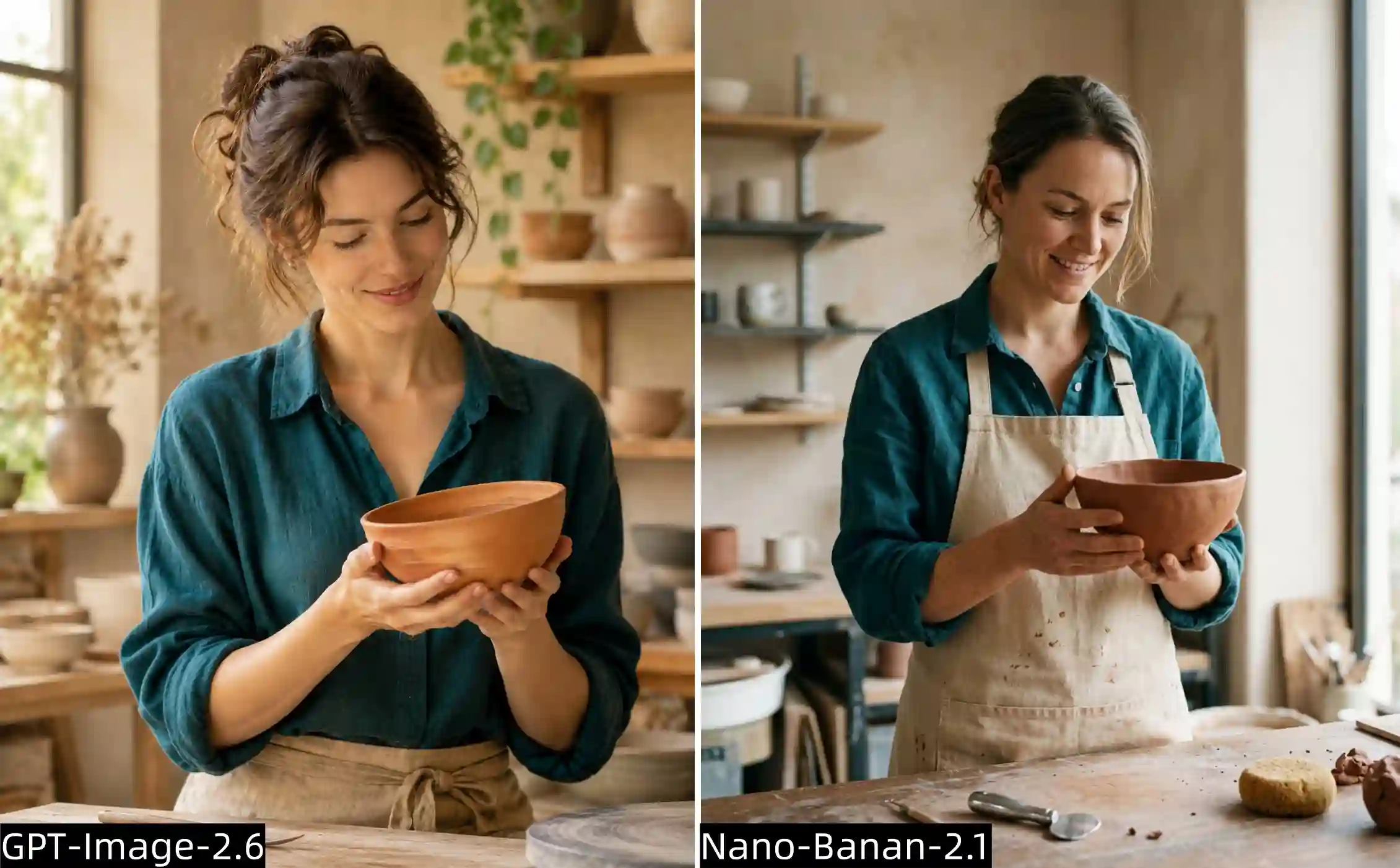
For AI portrait realism, examine how skin, light, and surrounding materials work together. More visible texture does not automatically make an image more convincing.
We asked both models to depict an adult ceramic artist holding a terracotta bowl in a refined studio. The brief combined skin, linen, clay, and directional daylight.
GPT Image 2.6 produced a more polished photographic treatment. Skin and lighting were softer, and the image felt closer to a carefully styled editorial photograph.
Nano Banana 2.1 looked more observational. Skin retained more visible detail, lighting felt more natural, and the terracotta bowl had a stronger sense of real material.
Both produced believable actions and distinguishable surfaces. The difference was in emphasis: GPT harmonized the scene, while Nano made the materials more individually apparent.
Creative guidance:
Describe the desired finish explicitly. A campaign portrait may benefit from soft editorial light; a craft or product image may need clearly visible surface texture. Review the materials separately from the face before choosing a result.
AI Poster Design: Text Accuracy, Hierarchy, and Impact
Readable words need a clear order of importance.
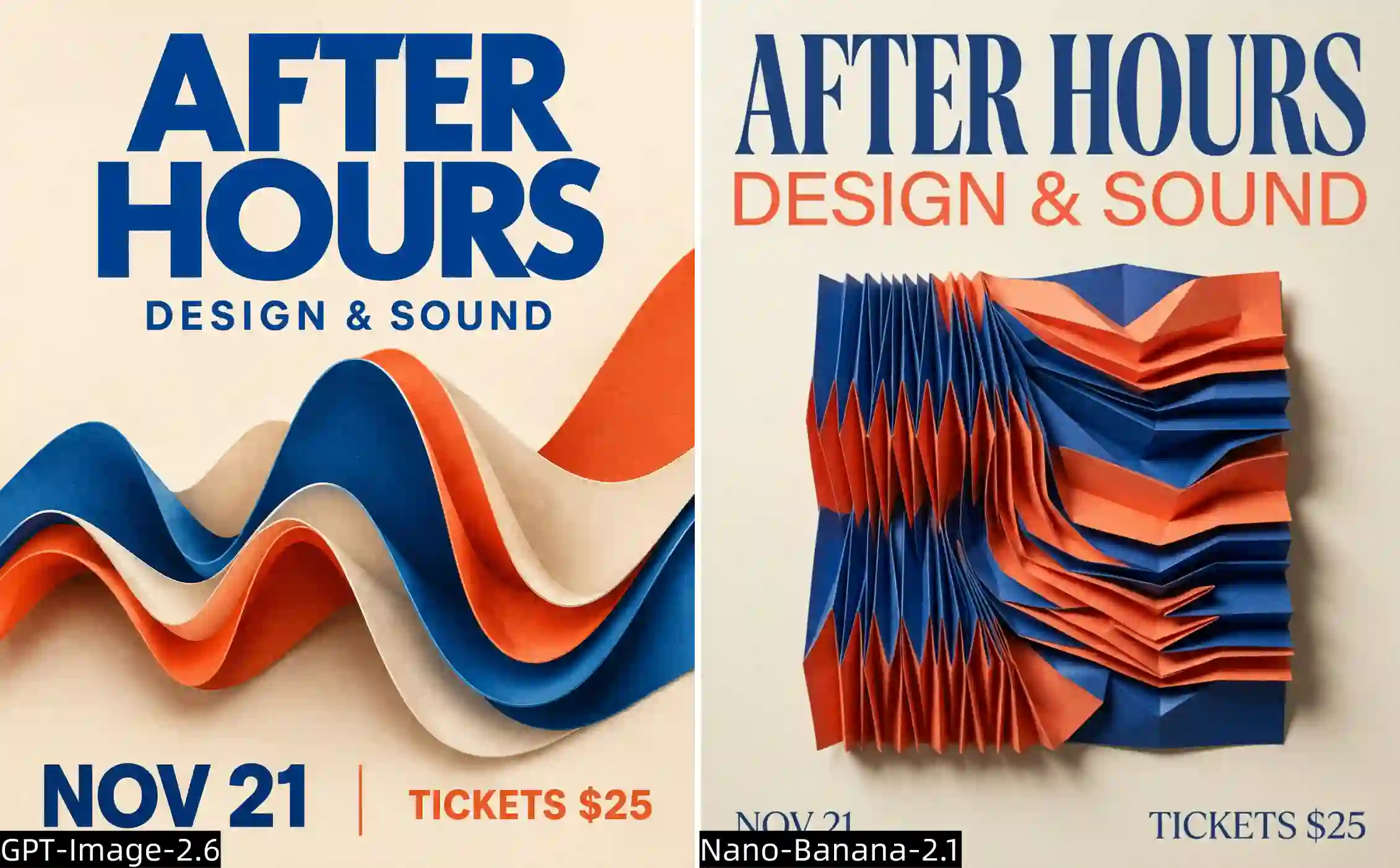
An AI poster generator must do more than spell correctly. The design should guide the viewer from the main message to the supporting information.
Our fictional music-and-design poster brief specified an abstract sound-inspired visual and four pieces of copy: “AFTER HOURS,” “DESIGN & SOUND,” “NOV 21,” and “TICKETS $25.”
Both models rendered the requested wording correctly. The stronger difference was communication:
Hierarchy: GPT emphasized the main words through font weight and color.
Concept: GPT’s abstract visual was easier to connect to the theme.
Small-screen readability: GPT’s larger, more prominent text was easier to identify on a phone.
GPT-Image 2.6 result also had the more attractive overall design in this comparison. That supports its use as a starting point for event posters and social media graphics, without proving that it will always render text better.
Creative guidance:
Specify which line should dominate, then inspect the result at its intended viewing size. Correct spelling and effective typography are separate checks. Our mobile observation concerns readability, not measured engagement or conversion.
Multi-Reference Images: Consistency and Natural Staging
A faithful subject still needs to belong in the scene.
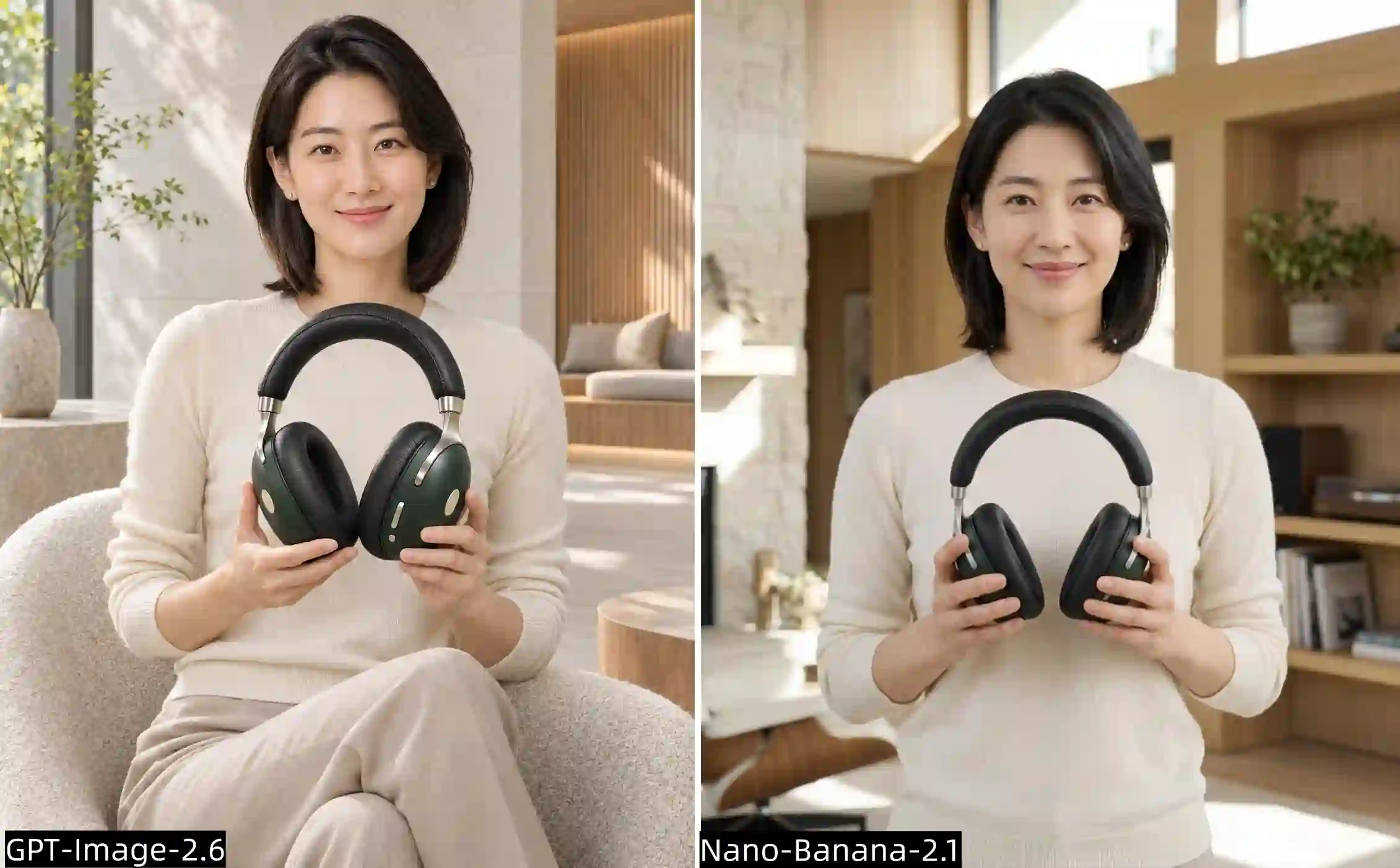
For AI lifestyle product photography, reference accuracy and natural staging both matter.
We supplied the same adult woman’s portrait and forest-green headphone reference, asking for a premium image in a contemporary listening lounge.
Both models preserved the woman and the headphones well, with no obvious consistency errors in our review. This task did not reveal a clear winner on reference fidelity.
The staging was different:
GPT seated the woman naturally, which suited the lounge setting and created a more comfortable scene.
Nano kept her standing, producing a comparatively posed, rigid impression.
Standing did not violate the prompt; a seated pose had not been required. GPT’s advantage here was its interpretation of the setting, rather than a basic compliance difference.
Creative guidance:
Assign each reference a role: identity, product appearance, setting, or style. If posture matters, state it explicitly. If you leave it open, judge the result by whether it supports the activity and mood.
Sketch-to-Image: Composition Accuracy and Creative Changes
An approved layout needs its own acceptance check.
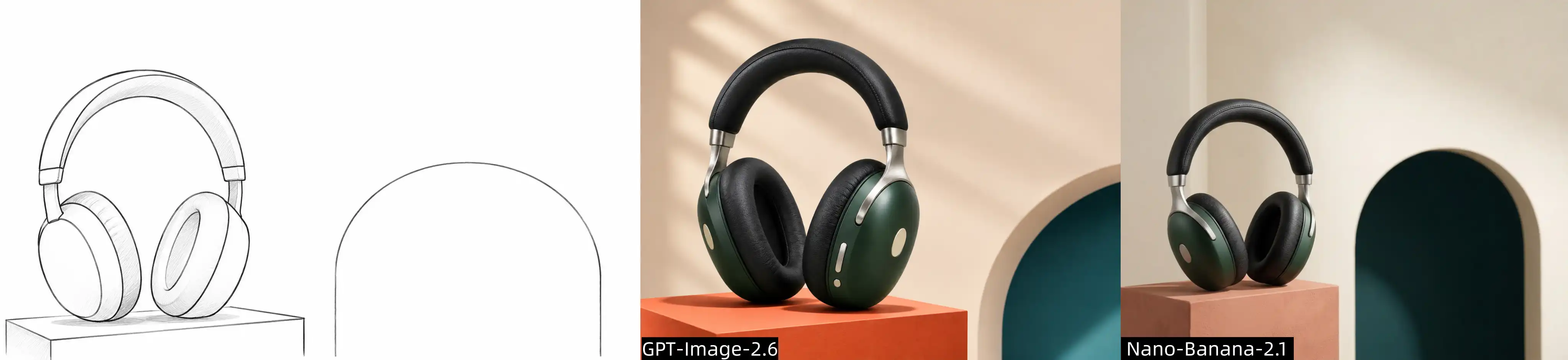
Sketch-to-image AI is useful when you already know where the product, background structure, and empty copy area should go.
We provided a rough headphone advertisement layout alongside the product reference. The sketch established the arrangement; the product photo supplied appearance and materials.
Layout Fidelity
Nano Banana 2.1 followed the sketch without an apparent composition error in our assessment.
GPT Image 2.6 made several visible changes:
The product orientation followed the product photograph rather than the sketch.
Part of the background arch was omitted.
The relative proportions of the composition changed.
Product Presentation
GPT added lighting that made the headphones more prominent and the overall advertisement more attractive.
Nano’s result looked more realistic and stayed closer to the supplied layout.
These observations support separate judgments: GPT delivered appealing art direction; Nano preserved the intended composition more faithfully in this task.
Make Reference Priorities Explicit
Orientation can become ambiguous when a sketch and product photograph show different views.
A more explicit instruction to try is:
Use the sketch for placement, scale, and viewing direction.
Use the product photo for shape, color, and materials.
Preserve the complete arch and the empty copy area.
This is a suggested refinement, not a verified fix from this test. Check the product outline, background structure, and reserved space before approving the image.
Multi-Turn Image Editing: Preserve the Scene Across Revisions
Compare each revision with the original and the previous result.
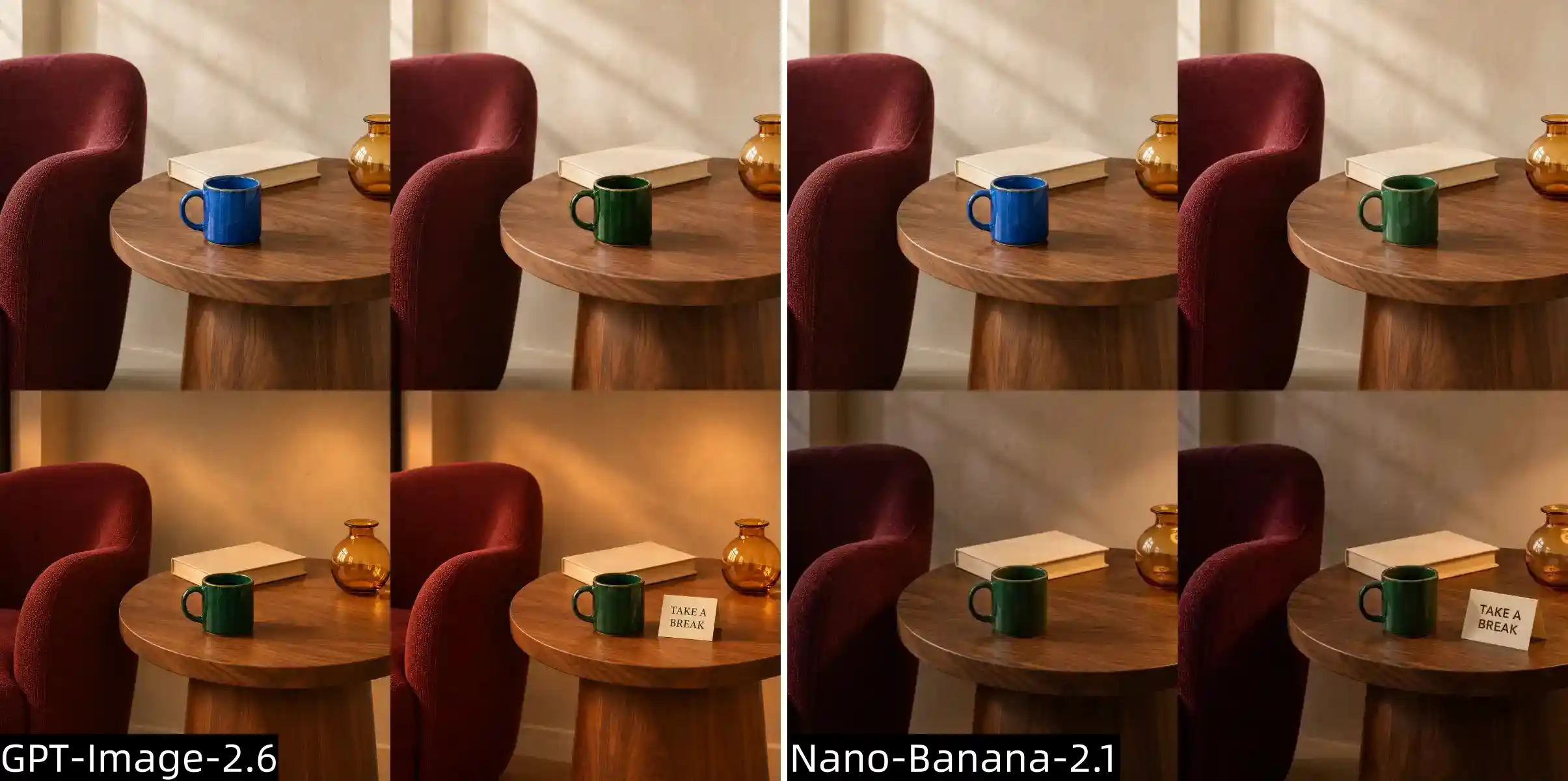
For multi-turn image editing, completing the latest instruction is only part of the task. Earlier decisions also need to survive.
We used a shared reading-corner image containing a burgundy chair, walnut table, blue ceramic mug, amber vase, and closed book. The editing sequence asked for three changes:
1.Recolor the mug deep forest green.
2.Change daylight to a warm evening setting.
3.Add a small cream card reading “TAKE A BREAK.”
Each model’s previous result became its next editing input.
Recoloring the Mug
Both models completed the color change. GPT’s green was darker, making the mug’s appearance across the later lighting change less easy to distinguish.
That is not automatically a recoloring failure. A dark surface under changing illumination requires a different judgment from a bright color swatch.
Relighting the Room
Across the later revisions, GPT emphasized warmer light and a cozy, polished atmosphere. Nano’s lighting treatment remained more naturalistic.
The more important preservation issue was framing:
GPT pulled the view farther back, changing the composition beyond the requested edits.
Nano showed no comparable extra changes in our assessment.
This matters when several images must share a fixed crop, product position, or background arrangement.
Review the Whole Editing Chain
Before approving a revision, check:
Current change: Did the requested adjustment happen?
Earlier changes: Is the revised color or lighting still present?
Protected content: Did the view widen, objects move, or proportions change?
For a follow-up, you could make the preservation requirement more explicit:
Keep the original crop and camera viewpoint. Do not zoom out, expand the scene, or reposition existing objects.
Inspect the next result rather than assuming that stronger wording guarantees preservation.
Output Formats, Resolution, and Pricing
Match the deliverable to the next step in your workflow.
The five comparisons above concern still-image creation and editing. Other capabilities can affect model choice, but they need their own checks.
Resolution: Download the original and check its pixel dimensions. A larger file can offer cropping room without necessarily adding convincing detail.
Transparency: For a transparent asset, inspect the actual background and edges, rather than relying on a PNG filename.
GIF and SVG workflows: GPT Image 2.6’s Image API provides these output options. Check access and the resulting file’s suitability for animation or editing. See GPT Image 2.6 AI GIF Guide for the animation workflow.
Pricing: Compare the same access method and output requirements. Chat subscriptions, platform credits, and API usage are different billing arrangements; this review does not establish a cheaper model.
Which Model Fits Your Creative Project?
Decide which parts of the image the model may redesign.
Based on these examples:
GPT Image 2.6 — For creative exploration.
Produces polished visuals and translates abstract ideas into compelling compositions.
It may rearrange elements or reinterpret instructions, giving you less control over exact execution.
Nano Banana 2.1 — For realism and control.
Emphasizes photographic realism and convincing material details.
It follows prompts more literally, with fewer unrequested additions, making it better suited to a clearly defined visual brief.
The following starting points reflect these tasks, rather than a universal ranking.
Your priority | What our results suggest |
Polished portrait lighting | GPT’s softer editorial finish is worth exploring |
Natural material detail | Nano gave surfaces more distinct, realistic character |
Poster hierarchy and abstract design | GPT communicated the theme more clearly |
Person-and-product references | Both preserved the supplied subjects well |
Fixed sketch composition | Nano stayed closer to the prescribed layout |
Revisions with stable framing | Nano retained the scene more faithfully in the editing sequence |
For your next project, identify the non-negotiable details before generating: wording, product geometry, layout, or framing. Then evaluate visual appeal within those requirements.
GPT Image 2.6 vs Nano Banana 2.1 FAQs
Which is better, GPT Image 2.6 or Nano Banana 2.1?
Choose GPT Image 2.6 for creative interpretation and cinematic visuals. Choose Nano Banana 2.1 for photographic realism, material detail and closer adherence to a defined brief.
Which model is better for product photography?
Nano Banana 2.1 is a good starting point for realistic product details. GPT Image 2.6 suits campaign concepts where lighting, atmosphere and composition matter more.
Why does GPT Image 2.6 change my composition or add elements?
It may interpret the brief creatively. Specify what must stay fixed and what can change, including object count, placement and background details.
Does Nano Banana 2.1 always follow prompts exactly?
No model guarantees perfect execution. Nano followed our example prompts more literally, but object counts, positions and important details still need checking.
Does higher resolution improve instruction following?
Not necessarily. More pixels do not ensure correct placement, complete background structures, or unchanged framing. Check those requirements independently.
Which model is cheaper to use?
Compare costs at matching settings. Resolution, quality and platform pricing affect the total. Include retries when calculating the cost of a usable image.
Can I use both models in one creative workflow?
Yes, explore with GPT, then test targeted refinements with Nano. Use the selected image as a reference and specify which composition, lighting and details should remain unchanged.