
A useful AI image needs more than attractive detail. It must communicate clearly, follow the brief, and hold up through edits.
We tested GPT Image 2.6 and Seedream 5.5 across seven creative tasks. Here is where each model stood out, and what I would check before publishing.
TL;DR
Choose GPT Image 2.6 for information-rich designs. It interpreted context and developed useful details, but sometimes overcomplicated the image.
Start with Seedream 5.5 for natural realism and visual appeal. Its composition and lighting were stronger in these tests. Dense information needed closer checking.
Both preserved character identity well. Seedream handled environmental lighting more convincingly in my editing sequence.
Check accuracy separately from appearance. Attractive results still contained errors in anatomy, reflections, punctuation, or labels.
GPT Image 2.6 and Seedream 5.5 at a Glance
Know the model, its controls, and its output.
The table compares published specifications and documented API controls. These describe capabilities, rather than the settings used for every test.
Specification | GPT Image 2.6 | Seedream 5.5 |
Release date | November 4, 2026 | November 9, 2026 |
Model versions | Sunburst; Flare | Seedream 5.5 |
Input types | Text; images | Text; images |
Text-to-image generation | Supported | Supported |
Reference-based image editing | Supported | Supported |
Multi-turn editing | Supported | Supported |
Transparent output | Transparent PNG/WebP | Native RGBA; full and partial transparency |
For GPT Image 2.6 Flare vs Sunburst, Sunburst focuses on demanding detail and precise editing. Flare serves everyday creative iteration. All GPT results below use Sunburst.
Quality controls rendering detail. Complexity controls planning before rendering.
How We Tested GPT Image 2.6 and Seedream 5.5
Same prompts. First results. Practical checks.
We selected Sunburst to explore GPT Image 2.6’s strongest capabilities in detailed generation, complex composition, and precise editing.
Prompts: The same Chinese instructions for both models.
Outputs: First results, without choosing a better reroll.
Coverage: Six static comparisons and one five-round editing sequence per model.
Checks: Content, placement, interactions, text, identity, and unintended changes.
Each editing sequence continued from that model’s own initial portrait. We compared consistency within each sequence.
These findings describe this test set. Different prompts and settings can produce different results.
Image Quality: Realism, Lighting, and Composition
Look for convincing light and a clear subject.
Photorealistic Portraits and Skin Texture
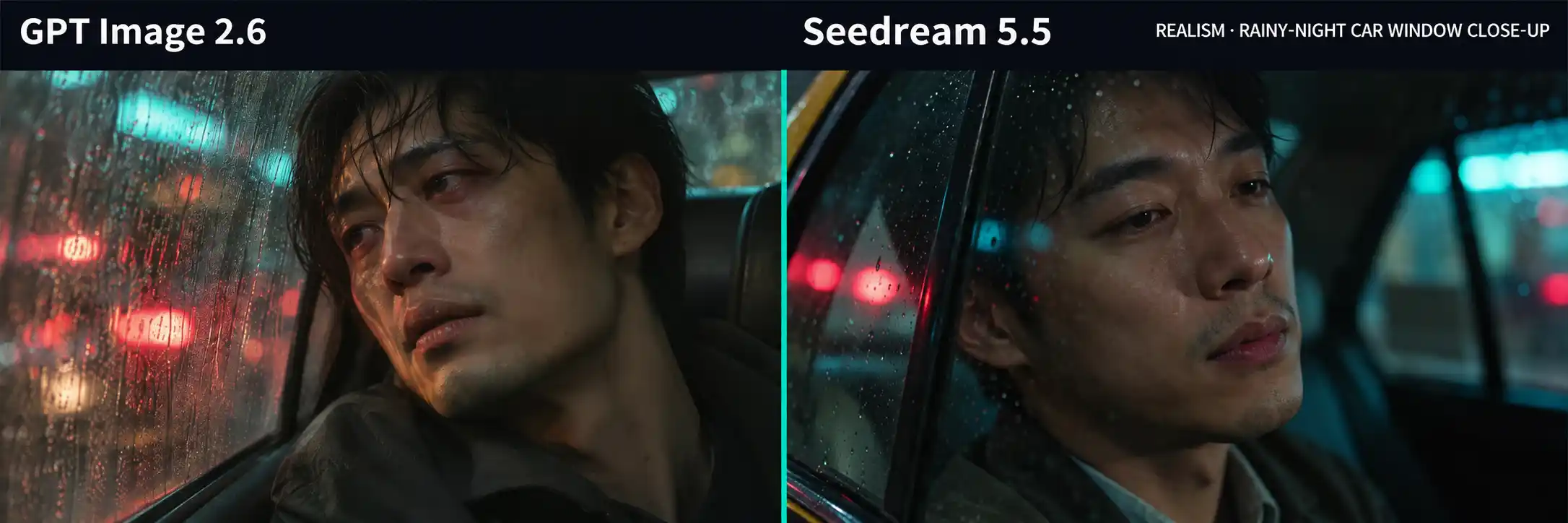
We asked for a tired man beside a rain-covered car window. The goal was believable skin and restrained emotion.
GPT pushed the effect too far:
Skin reflections looked overly refined and artificial.
Bright light outside the window competed with the face.
The expression made the fatigue feel exaggerated.
Seedream produced the more convincing portrait.
Seedream’s treatment was quieter. The tiredness was subtle but accurate. Skin, expression, and lighting felt closer to a real photograph.
For photorealistic AI portraits:
Specify emotional intensity and keep background lights secondary.
Check whether fine texture adds realism or simply makes the image look processed.
This approach suits editorial portraits, brand storytelling, and cinematic cover images.
Composition, Negative Space, and Art Direction
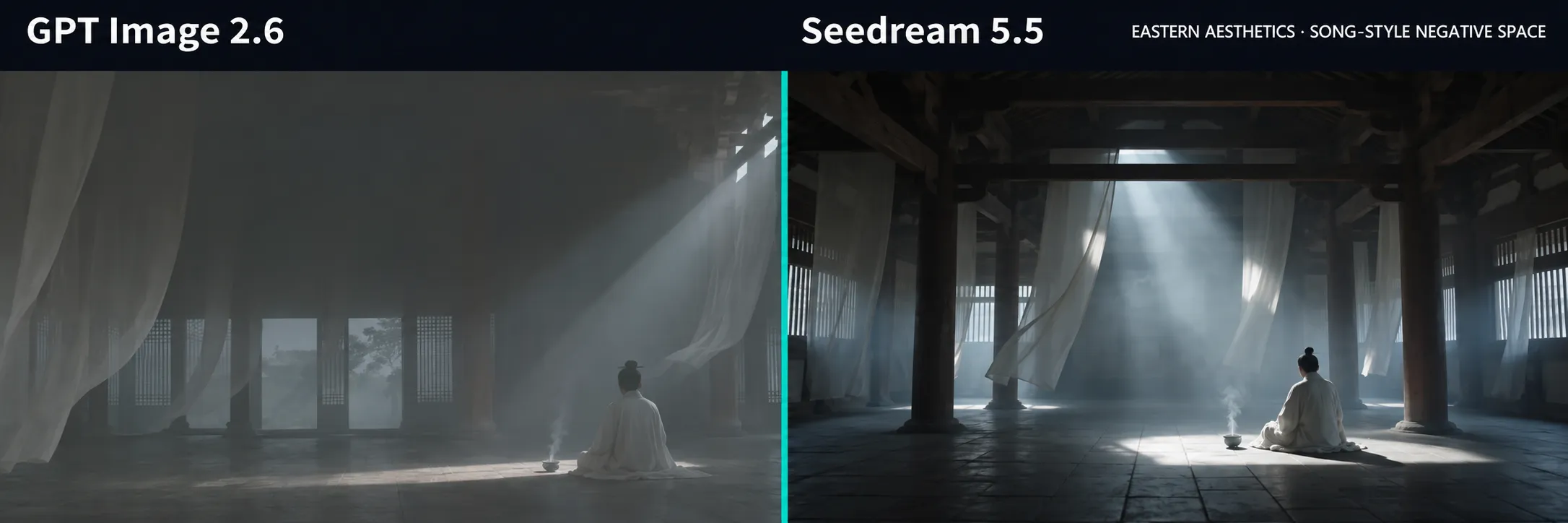
The traditional hall test explored Chinese aesthetics, atmosphere, and negative space.
GPT: More realistic architectural rendering. Strong detail and believable light. Weaker composition and insufficient negative space.
Seedream: Better light-and-shadow organization. Clearer visual layers. More effective negative space and atmosphere.
GPT rendered the architecture well. Seedream composed the more attractive image.
For website banners and posters, define the subject’s size and the location of empty space. Leave enough room for the final headline.
Prompt Following: Complex Scenes and Physical Details
Check relationships as carefully as individual objects.
Long Prompts and Spatial Relationships
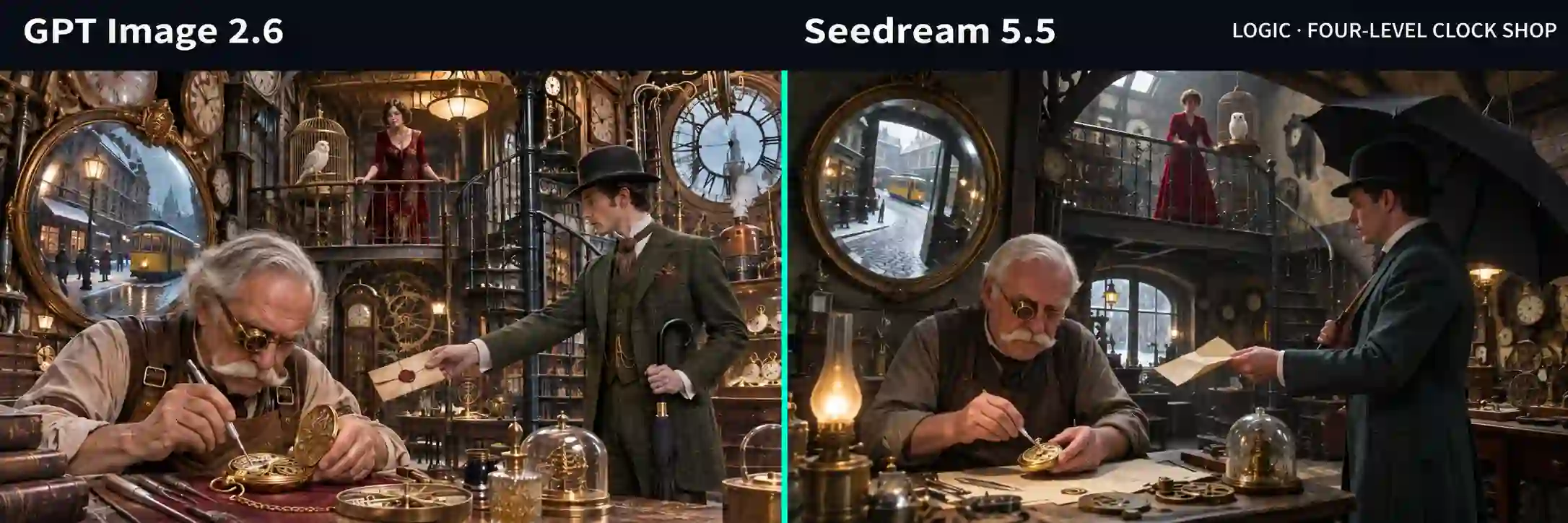
The clockmaker’s workshop combined several people, distinct props, multiple depth layers, and a reflected street scene.
Both models included the complex elements.
GPT added more detail, but the result felt busy and less attractive.
Seedream’s lighting and composition made the scene more coherent and realistic.
Two props showed how differently they interpreted the brief:
Umbrella: GPT closed it indoors. Seedream opened it inside the shop.
Parchment: GPT replaced the requested folded parchment with a wax-sealed letter.
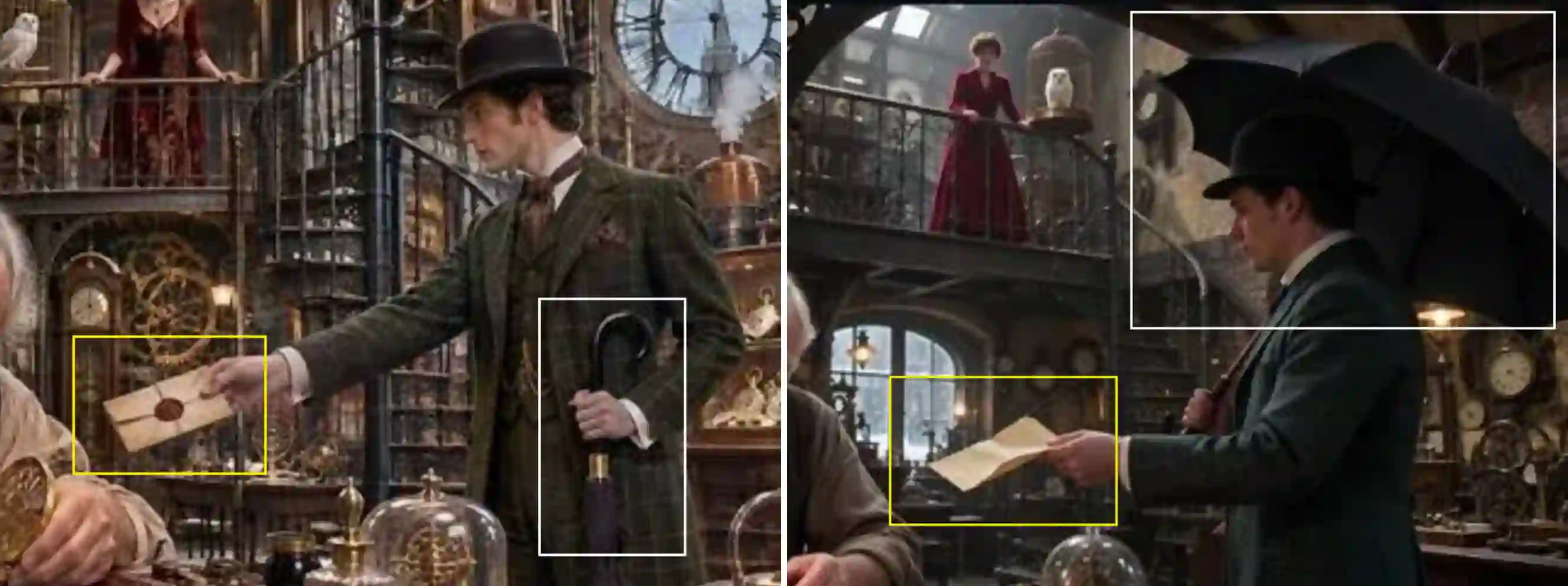
GPT made contextual judgments. Seedream followed the wording more literally in this scene.
Closing the umbrella improved plausibility. Adding a seal enriched the story, but changed the requested object.
GPT’s initiative was useful in one detail and unnecessary in another.
For better AI image prompt adherence:
State essential object conditions, such as open or closed.
Identify which details must remain exact.
Limit extra props when the main subject needs priority.
Hands, Contact, Reflections, and Glass
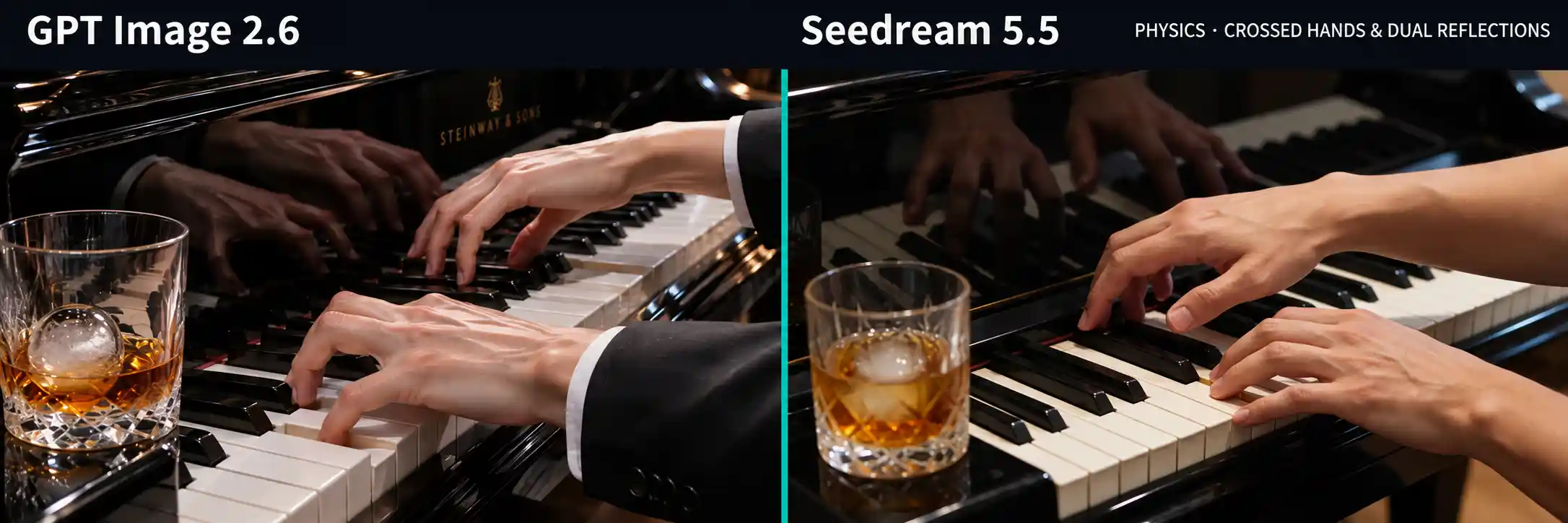
The piano test combined hands, polished reflections, and a foreground glass.
GPT overemphasized the hand detail. The hands looked excessively thin, while the glass drew attention away from the playing action.
Seedream looked more natural. Its softer-focus glass supported the depth of field and kept the hands prominent.
Both results still contained clear errors:
GPT generated two left hands. The anatomical mistake was immediately distracting.
Seedream’s reflection did not match the hands. The overall image looked convincing, but the optical relationship was wrong.
Seedream had the better photographic impression. Neither image was ready to publish unchanged.
Check separately:
Hand anatomy, contact with objects, and mirror relationships.
Keep foreground props secondary unless they are the subject.
Explore AI Image Creation Guide
Text Rendering and Multilingual Poster Design
Read every word. Then judge the design.
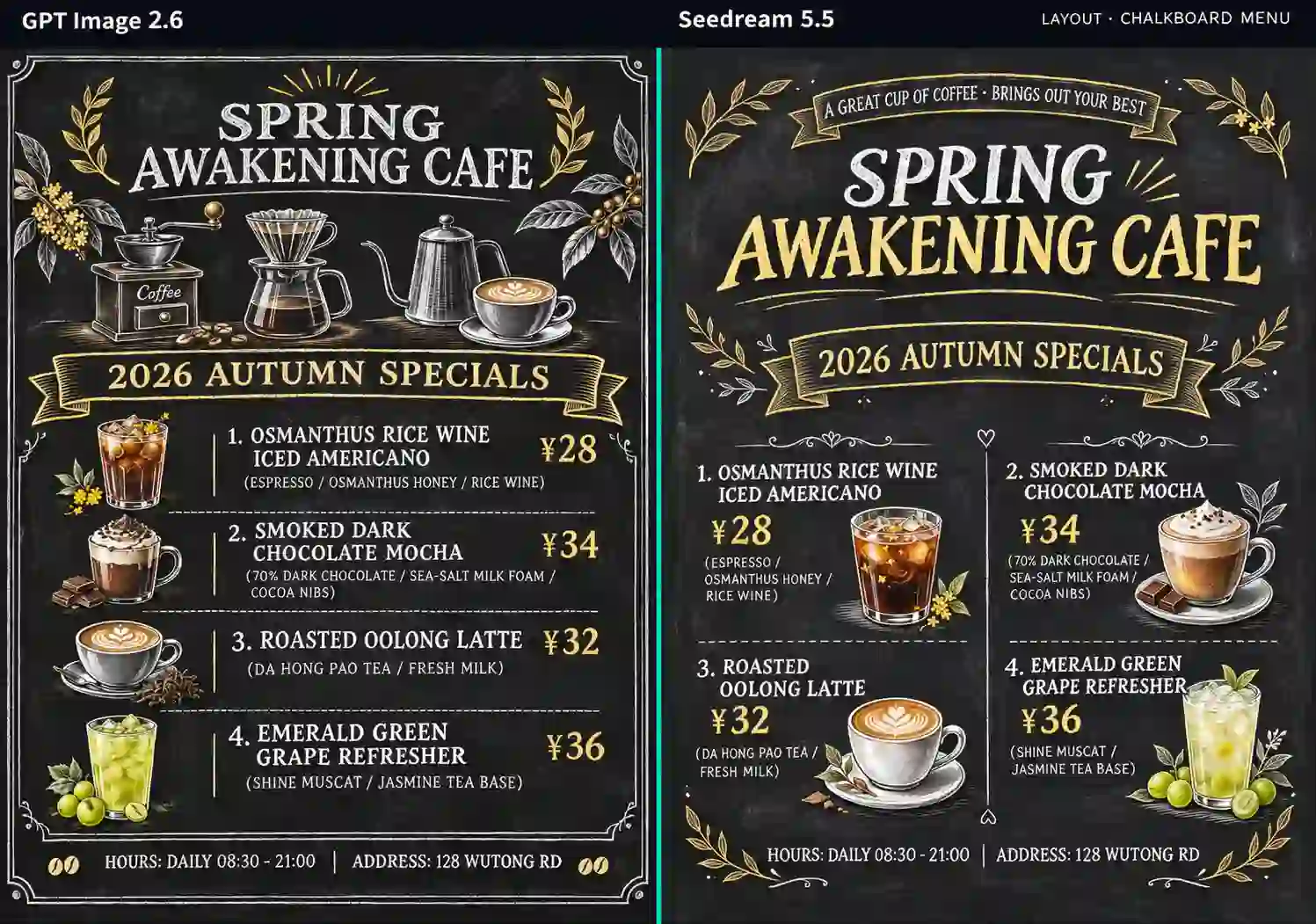
We tested AI text rendering with a bilingual coffee menu. It included headlines, prices, ingredients, and small supporting text.
GPT produced the more professional and attractive menu.
Its added coffee-making equipment helped the design:
Relevant illustrations supported the café’s identity.
Typography created a clearer hierarchy.
The result worked better as promotional material.
Layout compliance was a separate issue.
GPT used one column instead of the requested two. Seedream followed that arrangement more closely, but we preferred GPT’s overall presentation.
For multilingual poster design, inspect three things:
Copy: Wording, punctuation, prices, and small text.
Layout: Columns, alignment, and reading order.
Design: Visual hierarchy and relevant supporting imagery.
Use this checklist for menus, event posters, and localized campaigns.
Fix the final wording first, then allow room for design choices.
Image Editing: Character Consistency and Natural Relighting
Preserve the identity. Adapt the light.
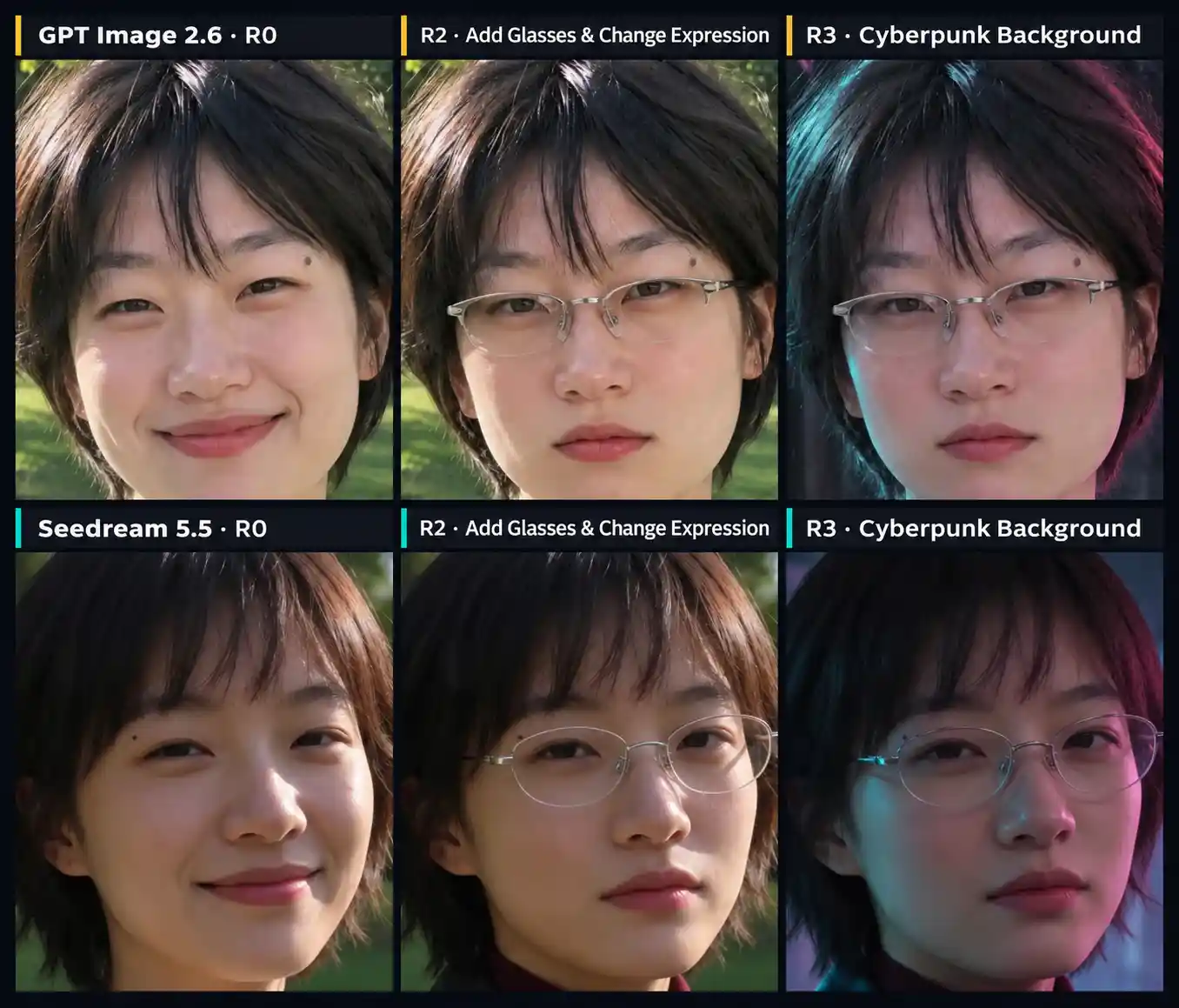
My multi-round editing sequences changed clothing, accessories, expression, background, and smaller details.
Both models maintained good character consistency and completed the requested edits.
Lighting and image cleanliness separated the results.
Background Replacement and Lighting Adaptation
After the change to a neon night setting:
GPT: Environmental light had little influence on the face. The person felt detached from the new surroundings.
Seedream: Light from the scene affected the face more naturally. The result looked more coherent and attractive.
Detail Preservation Across Edits
GPT’s face also became less clean. Colored speckles appeared, and fine facial details became less distinct.
We preferred Seedream for this multi-turn image editing sequence. It combined recognizable identity with more convincing environmental integration.
For character campaigns and outfit variations:
Specify what stays fixed: identity, hairstyle, clothing, or accessories.
Specify what should adapt: illumination, reflections, and environmental color.
Recheck the face after every background replacement.
Infographics and Technical Diagrams
Make the structure as clear as the surface.
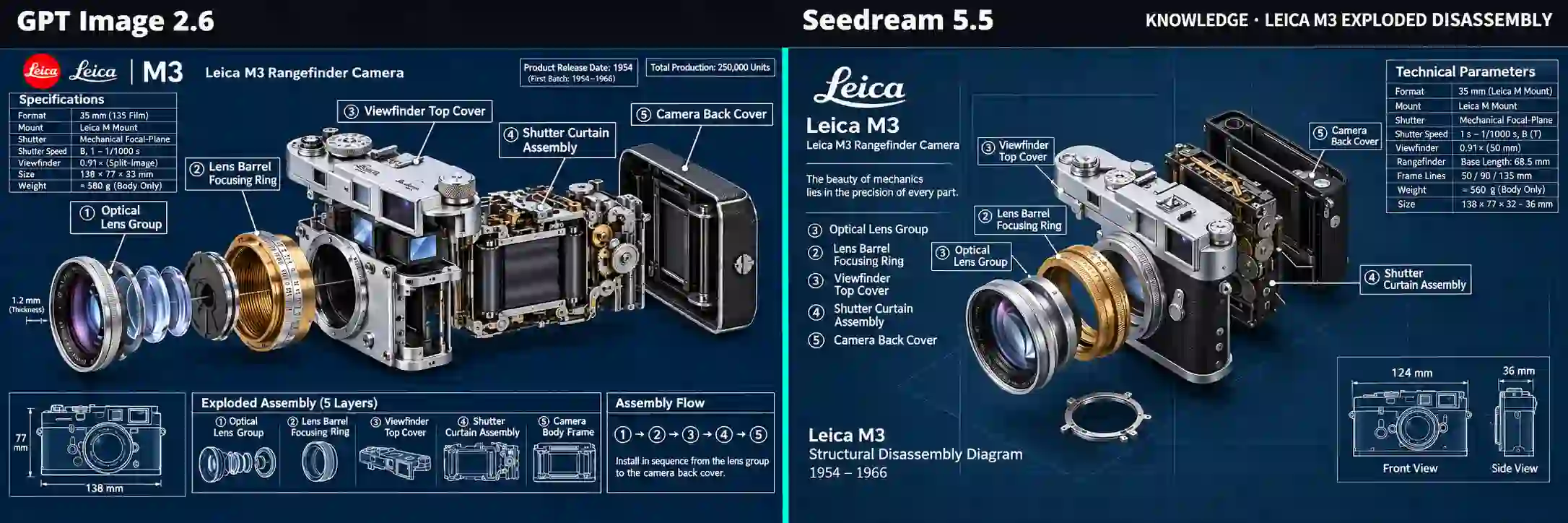
The exploded-view camera test was GPT’s clearest win in information design.
GPT delivered a more complete, precise, and polished response to the brief.
It provided:
Clearly separated camera components.
Appropriate labels and organized information.
An additional specification panel in the upper-left corner.
A coherent, professional layout.
Seedream rendered attractive metal and glass. Its information handling was weaker:
Two labels repeated the number 3.
The camera was not properly separated into the requested structure.
Text placement felt rigid and less integrated.
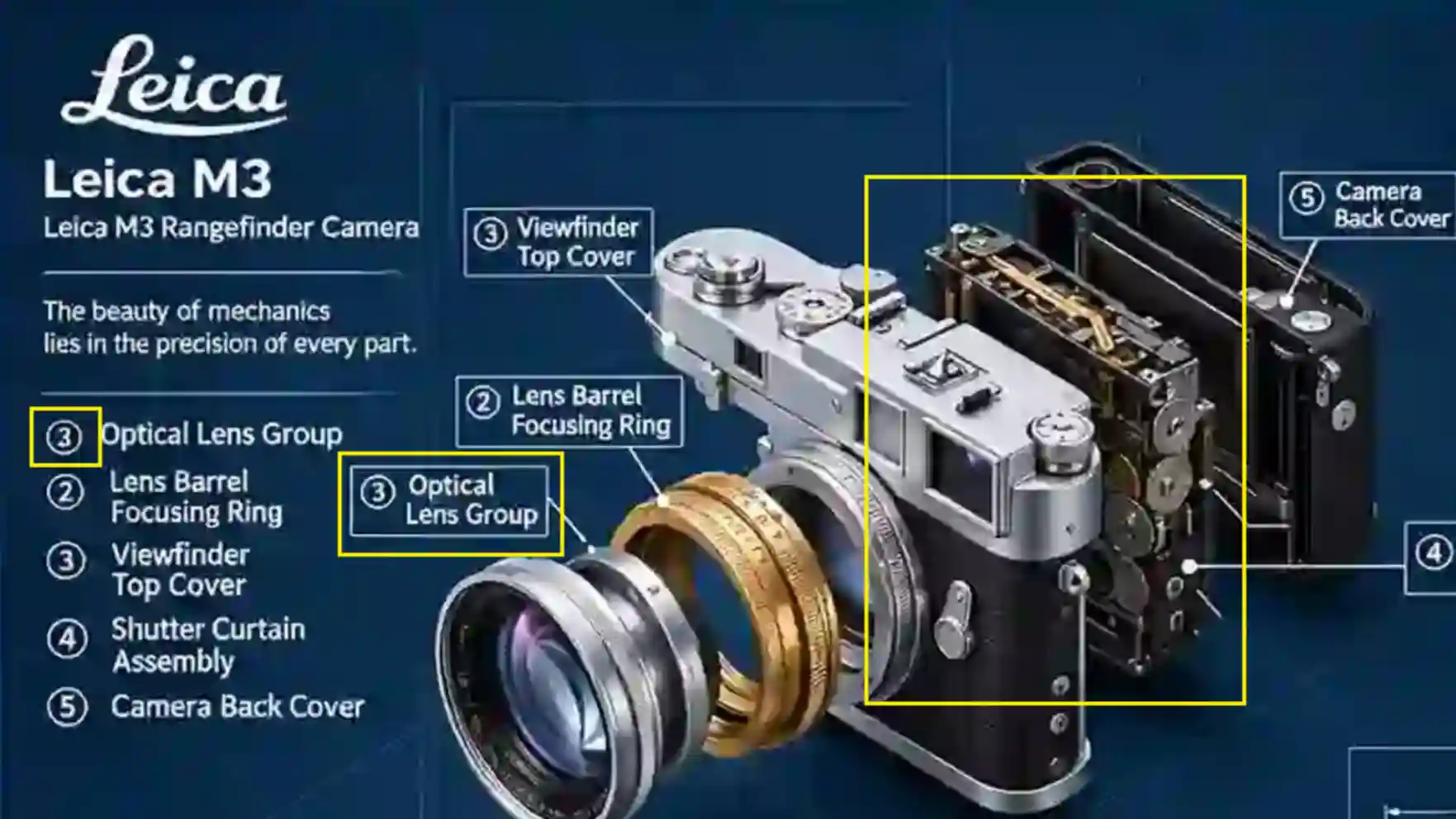
For an AI infographic generator, attractive materials cannot compensate for incorrect structure or labels.
Start with GPT for information-dense explainers and labeled diagrams based on this result.
Provide verified facts, then check every connector and label.
Apply the same checks to product explainers, presentation graphics, and instructional diagrams.
Resolution and Creative Output Formats
Choose a file that fits the next step.
Resolution and Aspect Ratio
Check the original download’s pixel dimensions. More pixels do not guarantee readable text or correct details.
Match the aspect ratio to the placement. Inspect the subject and smallest text at the intended display size. For print, use the original file rather than a compressed web preview.
Transparent PNGs and RGBA Assets
Both models support transparent backgrounds. Seedream 5.5 explicitly supports native RGBA with full and partial transparency.
For stickers, product overlays, and campaign lettering:
Check the actual alpha channel.
Inspect edges against light and dark backgrounds.
Look for unwanted halos around fine details.
A PNG extension alone does not prove transparency.
SVG Graphics and Animated GIFs
GPT Image 2.6 also supports SVG generation and animated GIF output.
Use SVG for scalable graphics and GIF for short loops.
These are additional output options, separate from my static-image and editing tests.
Explore GPT Image 2.6 GIF Guide
Which Model Fits Your Creative Workflow?
Choose by the detail that matters most.
Natural portraits and atmospheric illustrations: Start with Seedream 5.5. Its restrained expressions, light, and composition were more convincing in these tests.
Information-rich images and explainers: Start with GPT Image 2.6 Sunburst. Its camera diagram had clearer structure and stronger supporting information.
Posters with substantial text: Give GPT a close look. Its menu had the stronger commercial finish. Still check exact wording and layout.
Character series and scene changes: Start with Seedream for environmental integration. Both models preserved identity well in my editing sequence.
Product promotion and visually led campaigns: Consider Seedream when visual appeal leads the brief. Use references and check packaging, logos, and labels.
Complex concept scenes: GPT can develop rich contextual detail. Specify essential facts and keep secondary elements from overwhelming the subject.
With GPT, control additions and visual emphasis. With Seedream, check dense text, numbering, and structural relationships.
GPT Image 2.6 and Seedream 5.5 FAQs
Can I Use the Same Prompt for GPT Image 2.6 and Seedream 5.5?
Yes. Keep a shared baseline before making model-specific adjustments. This makes differences in interpretation easier to identify.
Do I Need Very Long Prompts to Get Good Results?
No. Prioritize the subject, composition, essential text, and required changes. Add detail to resolve a specific ambiguity.
Is a Transparent PNG the Same as a Layered Design File?
No. Transparency does not provide separate editable text and object layers. Keep your layout in a design document if you need that control.
Can I Upload My Own Photos or Product Images?
Yes. Both support image inputs and editing. Identify which faces, shapes, logos, or labels must stay unchanged.
Can I Use the Images for Print?
Yes. Check the original pixel dimensions against the print size. Inspect small text, edges, and fine details at the final reproduction size.
Can I Use Generated Images Commercially?
Check the service’s commercial-use rules and applicable model terms. For PWZ projects, review its usage information and Terms of Service, including rights to uploaded references.
Do I Need to Install or Run Either Model Locally?
No. You can use an online image-generation service. PWZ provides browser-based image creation without a local inference setup.